Thursday, March 4, 2010

Family ChArtist--Adding Pictures

So today I'm going to give you some ideas on how to add pictures. Thanks to Erin, for helping me out with some samples today. You get to see another person's family for a while. And Erin always comes up with great ideas that I never would have thought of.
On this first one she has the baby pictures of the couple who started it all, and then a modern picture of their family
On this one she offset the focus person, and then put the family on the bottom again. Sweet and simple with that beautiful font.
On these she's added pictures of the main person in the center of a left to right chart.
With the hints I gave you the other day about sizing and shaping the layout of the genealogy chart, there are lots of things you can do Besides adding pictures of embellishments, you can add pictures as backgrounds. Like we talked about earlier, you can set the transparency to focus more on the picture, or more on the genealogy information. And then of course you can do a genealogy chart with no genealogy at all. This one has a timeline of the husband and wife on the top, the wedding picture and then pictures of the family and children below.
And combining pictures with the backgrounds you can come up with beautiful things too.
I've so enjoyed seeing what the testers have come up with. They've come up with beautiful designs I never would have thought of. I can't wait to see what you come up with too.

Wednesday, March 3, 2010

Family ChArtist--Shields and Monograms

One of my favorite sets of graphics is the 22 shields we have for your genealogy charts. Now I know these aren't really family crests. If you have a family crest you would like to add to your chart you are welcome to upload it like you would a picture. But if you don't have copies of a family crest you need, these add a pretty decorative element. Take a look:

Some of them have decoration in the middle and some of them are blank in the middle.If you use the title feature to place an initial over the shield, it becomes a monogram, like this:Or this:

You can even use a picture in the blank shields like this:And then you could even use the title feature just to put in a monogram without the shield. Anyway you slice it, there's lots of options in Family ChArtist

Tuesday, March 2, 2010

Family ChArtist--Genealogy chart display options

Get ready for a long blog post--I've got lots of pictures for you today to illustrate some options we've put in Family ChArtist.

To start with you come across the first two tabs: "Choose Layout" and "Add Genealogy Info." We debated for a while which needed to come first, so you may do some flipping back and forth between these two tabs when you are first starting your chart. "Choose Layout" won out on being first, because when you go to manually create your chart, we needed to know which way to lay out the blank chart.

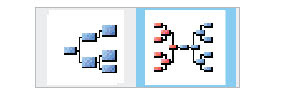
So the first thing you will want to choose is which style you want to create. We're releasing Family ChArtist version 1 with our two most popular styles. A regular right to left pedigree and a bowtie. You just click on the one you want.Then when you add your genealogy information on the next tab, you'll come up with something like this to start with:
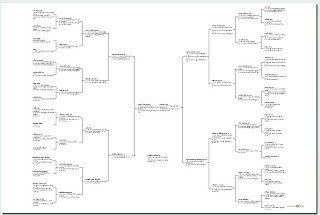
At this point you may want to go back to the "Choose Layout" tab to check out some more of the options and tweak your chart a little. First you'll want to choose a paper and size (discussed in a previous blog post) And then you'll want to choose a box style (also discussed in a previous blog post.) All of these choices are available in the editing panel on the "Choose Layout" tab.
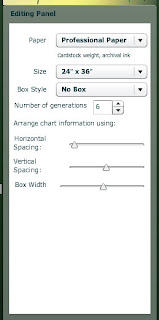
Now, you sharp readers out there will notice something in the editing panel that we haven't talked about previously. The "Arrange chart information using:" section. This section of the editing panel gives you control over how the chart is laid out. The first two slide rules are about the space between the boxes. And the last slide rule is about the size of the box.
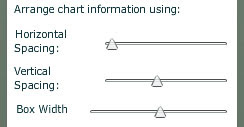
Let me show you some examples. First, with horizontal spacing, you can control the space between the generations like this:
wide:
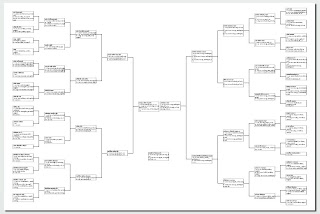
or tight:
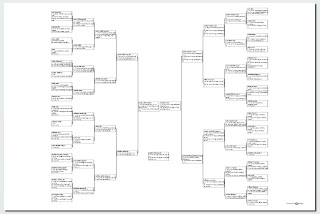
Then with the vertical spacing, you control the spaces within a generation like the wide ones above, or this tight one here: (remember, keep your eyes on the spaces between the boxes. Between those two controls, you can shrink the chart size down to be able to use more of the space around it for decoration (below) or spread it out to take up all of the space on the chart.
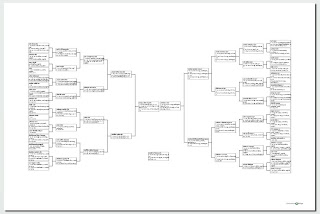
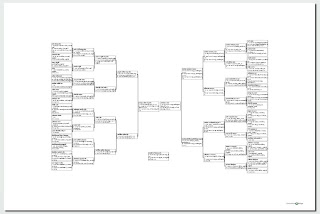
Then there is box width. On this same chart, when I widen the boxes, it actually also shrinks the height of the chart because there aren't as many lines of text wrapping down to the next line. Like this:
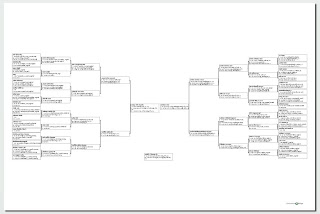
Or I can shorten the width of the box and create a chart that is taller, but has more room on the sides for pictures or decorations, like this:
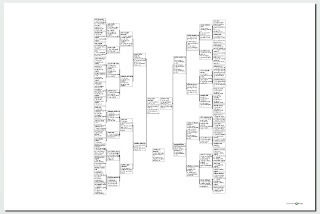
So you can see there is lots to play around with, even just on one style of chart. As you begin to decorate your chart, you can flip back and forth to be able to adjust the chart the way you want it. All sorts of options for your creativity.

Monday, March 1, 2010

Family ChArtist--Additional Information

Note: Apparently when I posted this last night, it posted to the wrong date and thus got lost further down the blog. I'll repost it here in case you missed it. This is a cool feature with lots of possibilities. I want to make sure you see it.

Ok, so you can import your genealogy information into Family ChArtist from a GEDCOM or from FamilySearch so far. (We made more progress this last weekend and have begun the process to bring several more companies into direct import with Family ChArtist.)

In that import, right now, we automatically import birth, marriage, and death dates and places. In the last 6 years, 99% of the charts we have done have been done with those vital statistics.
We've made this data totally editable in the program just in case you realize there is something on a database or even in your GEDCOM that you know is wrong. Such is often the case when you get it all out where you can see it. And sometimes you just want to fill things in such as spelling out Massachusettes in this sample:
In fact, because we have put unlimited spacing on each of these fields, you can actually add other information to each piece of data--such as adding the christening or the burial information with the birth or death, or the divorce information in with the marriage info.

But every once in a while, someone asks for different information in that data on a chart. We've been asked about adding personalities or qualities to the data on a chart. We've done charts with careers, or divorces or Age at death, hobbies, nicknames, military service or other recognitions such a being pioneers, or immigrants. So we left you a field on the bottom that gives you room for "additional information."
What else might you use it for?

Sunday, February 28, 2010

The St. George sneak peek went great.

We had a great time showing Family ChArtist to the St. George Expo attendees. The response was great and program worked well. Everyone can't wait for next Monday.
The crowd was wonderful. As always. It is always so fun to get to see all the good friends that we have at these conferences.
We had very little down time. Kim and I did get one second to talk to each other.
We pressed our son into helping with printing since we were so busy. It was exciting to have his help. And he was excited to be able to help. Let's hope it stays that way.

Somehow Geoff Rasmussen (legacyfamilytree.com) and Paula Vilburn (ohanasoftware.com) and I all lost our voices. It couldn't be germs shared between Arizona, Hawaii and Utah. I guess it was all the talking.
We used Mark Tucker's video on a loop, but we're still working out the bugs of having a booth with the new product. We were able to show people one at a time at the computers, but I'm afraid we missed alot of people that way.

We're going to get a bigger screen to show the video and do demonstrations for more people at a time. We'll probably follow RootsMagic, (www.rootsmagic.com) who were able to teach lots of people at their booth with their new screens. I'm not getting to meet as many new bloggers/tweeters as I used to, most of them are all good friends now. But I did get to meet Rebecca Trujillo Batty (www.familyhistoryengineers.com) for the first time. What a sweetheart she is. I'm so glad to have her as a new friend. And Holly does such a great job as usual. It is so fun to watch all the great giveaways at the end of the conference. There is so much to win at her events. Computers, trips to the SL library, Software, and of course Generation Maps gift certificates. Kudos to Holly not only helping people to do genealogy better, but also for making it such fun. Hope to see you at one of these great events soon. It is always such a party.

Family ChArtist--Religious symbols

Since we started out with New FamilySearch access, we thought at the beginning we would begin with a bunch of LDS graphics, but we have lots of other religious graphics in the program now, and plans for lots more graphics of all kinds as we ramp up with other companies. There are all sorts of options when you work in the transparency and color control that Family ChArtist has. We plan to keep the graphics in Family ChArtist fresh and add new things all the time. If you have any requests, let us know.

Saturday, February 27, 2010

Family ChArtist--LDS temples

To go with our New FamilySearch certification, we have put a whole bunch of LDS temple graphics in Family Chartist. So, if you are LDS, you might be interested in these: (If you are not, there are lots of other religious graphics too. Coming to a blog post near you soon.)


There are over 300 different temple graphics that you can use all different ways. And with the other graphics, you can even use them without the normal genealogy chart.
So get ready to check it out. We have lots and lots of options for you.

Friday, February 26, 2010

Family ChArtist--Twitter and Facebook and Genealogy Wise pages.

We've got the Twitter account and Facebook Page and GenealogyWise Pages up. I'm feeling a contest coming on. Check it out:

www.twitter.com/FamilyChArtist
Facebook
http://www.genealogywise.com/group/familychartistenthusiasts

Go become a fan, or follower and I'll tell you what, We'll do a drawing on the morning of the 8th for a 25$ gift certificate in each of those groups.

Good luck